For container freight stations in Kenya
Every box in your yard. Every shilling it owes.
Yardpro follows each container from gate in to gate pass, across your yard, customs, stripping, trucks and billing. Your whole team works from the same record.
Block A
Bays 01–12 · Rows R1–R6
TGHU 220381-1
A-04-R2
40' GP · Day 15 in the yard
- Customs
- Released
- Charges
- KES 83,520 still to pay
Gate out blocked
Start the shift knowing where you stand
Boxes in the yard, today’s gate moves, what’s waiting on customs and what needs attention, on one screen.


Screenshots on this page show sample data for a made-up company.
One container, from the truck to the gate pass
Follow TGHU 220381-1 through the yard. Each desk picks up where the last one stopped, so nobody retypes it or phones around for it.
-
1 · Gate in
Checked at the gate, not corrected later
The clerk enters the number and Yardpro tests its check digit, records damage and seals, suggests a slot and prints the EIR for the driver.
EIR-26-000041
- Container
- TGHU 220381-1
- Size
- 40' GP
- Truck
- KDA 117B
- Slot
- A-04-R2
Check digit valid
-
2 · Yard
Find any box in seconds
Every stack, reefer plug and shed bay is on one map. Stacking rules are built in, so a 40-footer can’t go on a 20 and only reefers take a plug.
Stack A-04-R2
- Tier 3
- HLXU 740218-0
- Tier 2
- CMAU 355072-5
- Tier 1
- TGHU 220381-1
2 boxes on top, 2 shift moves to reach
-
3 · Customs
Inspections that move the box for you
Book KRA, KEBS, KEPHIS, Port Health or PPB into a shed bay. The container’s status and location follow each stage, and it goes back to the yard when it’s released.
Inspection
- Agencies
- KRA, KEBS
- Bay
- Shed 1 · Bay 2
- Slot
- Thu 10:00
- Stage
- Inspecting
Box moved to the bay
-
4 · Stripping
Tally on the floor, outturn at the end
Count cargo line by line as it comes out, with shorts, overs and damage shown as you go. Loose cargo is tracked to its warehouse spot, and stuffing checks gross weight before sealing.
STR-26-0014
- HBL-55310
- 96 / 150
- HBL-55311
- 90 / 90
- Damaged
- 2 cartons
Outturn ready to print
-
5 · Trucks
No queue of surprises at the gate
Book each truck into an hourly slot, up to the limit you set. A transporter with expired insurance can’t be booked, and only those with a transit bond get transit trips.
APT-00128
- Slot
- Today 15:00
- Booked
- 4 of 6
- Truck
- KCZ 904M
- Trip
- Local
Insurance valid
-
6 · Billing
Storage worked out to the day
Free days and rate tiers are yours to set, and VAT is added for you. Issued invoices are never edited: they’re voided with a reason. M‑Pesa payments are matched to invoices.
INV-00041
- Storage, days 6–15
- 56,000
- CFS handling
- 14,500
- Documentation
- 1,500
- VAT 16%
- 11,520
- Total KES
- 83,520
Not paid yet
See the screens your team will use
Each desk gets a screen built for its job.


The yard, stack by stack
- Colour by height, status or days in the yard.
- Click a slot, bay or plug to see what’s there.
- See how many shifts it takes to reach a box.


Gate in and gate out
- Look a box up by container number or B/L.
- Release checks pass or fail in plain words.
- Print the EIR or gate pass from the same screen.


Customs verification board
- Each inspection sits in the column for its stage.
- Filter by agency, from KRA to Port Health.
- See how long a release is taking.


Shed schedule
- Every bay against every hour for the day.
- Click an empty slot to book it.
- Your own bays and inspection hours.


Live tally sheet
- Big buttons for counting on the floor.
- Counts checked against the manifest as you go.
- Damage and warehouse spots logged per line.


Truck bookings
- A day’s slots at a glance, hour by hour.
- Move each truck from arrival to departure.
- Track no-shows, empties and transporters.
7 · Gate out
A box can’t leave owing you money
Before the gate pass prints, Yardpro checks customs, charges, the delivery order, any open work and the booked truck. Loose cargo gets the same money check. Credit clients can leave within their terms, and cash clients pay first.
Every refusal goes in the gate log. When there’s a good reason to let a box through, a supervisor can override it, and the reason stays on the record.
What the gate clerk sees
-
KES 83,520 still to pay
Cash client, not paid in full
-
CFS handling not billed yet
Laden box, nothing on an invoice
-
On credit hold
Invoice more than 30 days late
-
On customs hold
Not released, so it can’t leave
-
All billed and paid
GP-26-000017 ready to print
Know what’s owed before it’s late
See what’s outstanding, what’s overdue and the storage still building up on boxes you haven’t billed yet. Payments go on by bank, cash or M‑Pesa, and a mistake is reversed with a reason, not deleted.


Credit control that holds at the gate
Give each client terms and a credit limit. Going over the limit, or more than 30 days late, puts them on hold automatically, and their boxes stop at the gate until it’s sorted.
The paperwork prints itself
Every document comes from the record, with your company’s name and KRA PIN on it, so nothing gets copied out by hand.
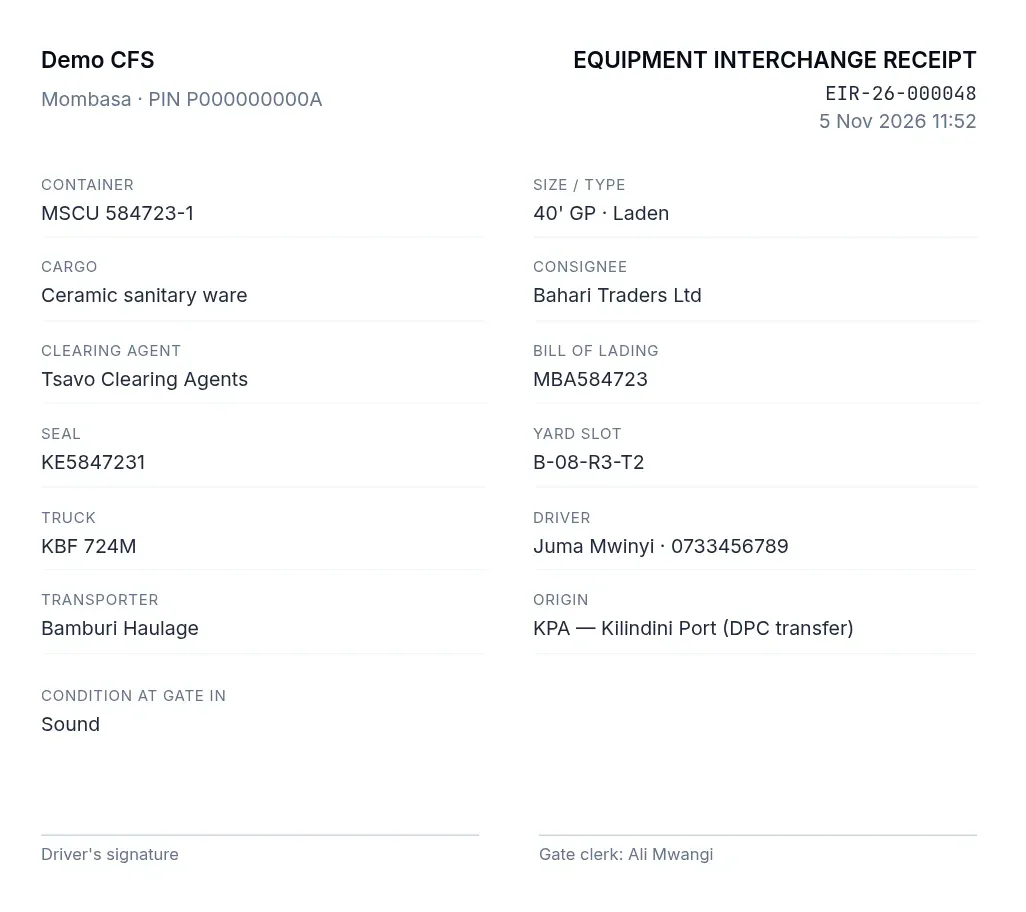
Equipment interchange receipt
Given to the driver at gate in
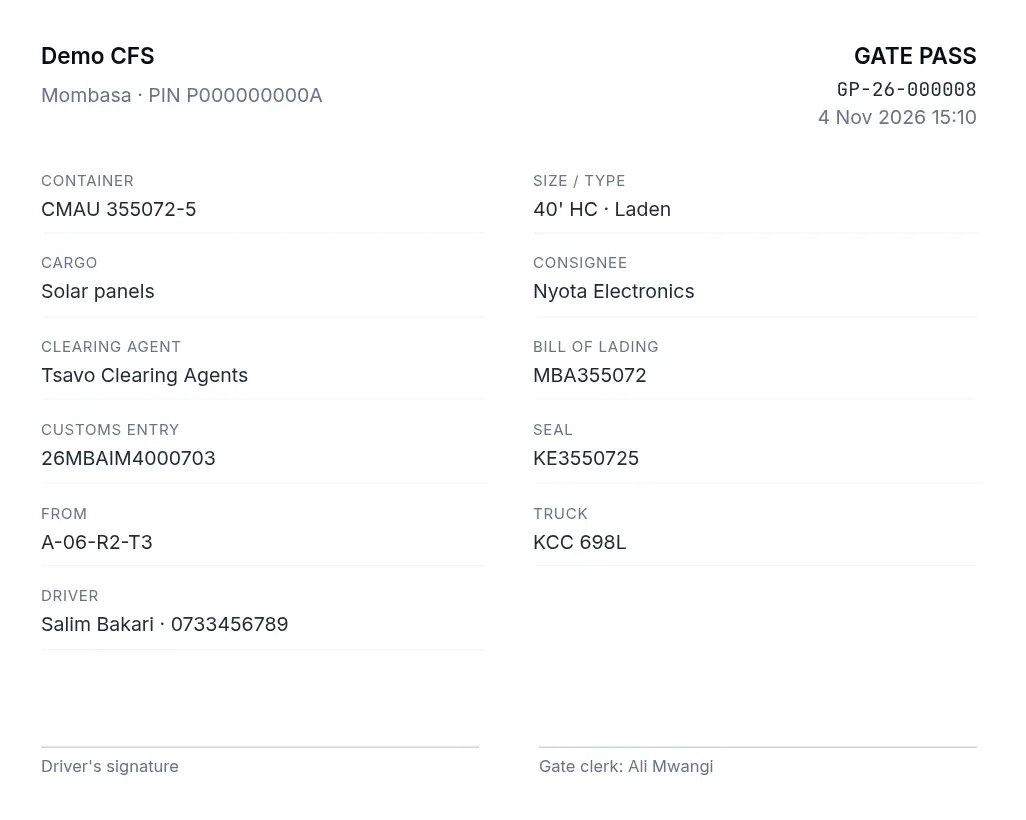
Gate pass
Printed when a box clears the gate
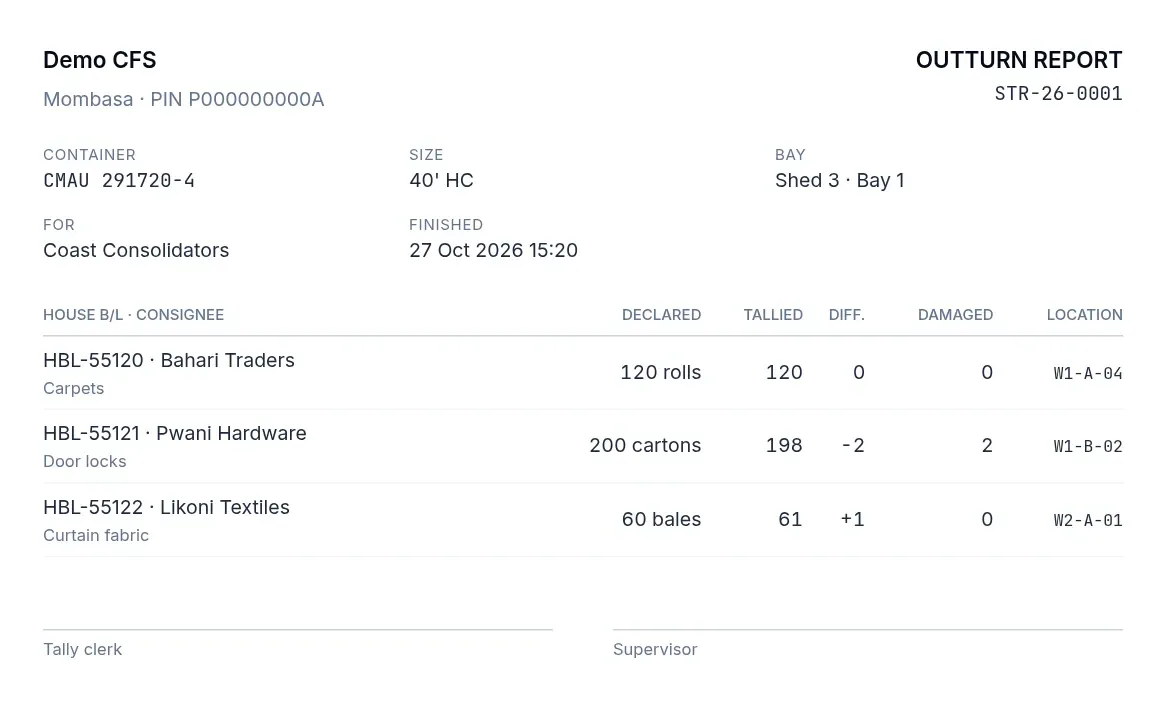
Outturn report
Declared against tallied, line by line
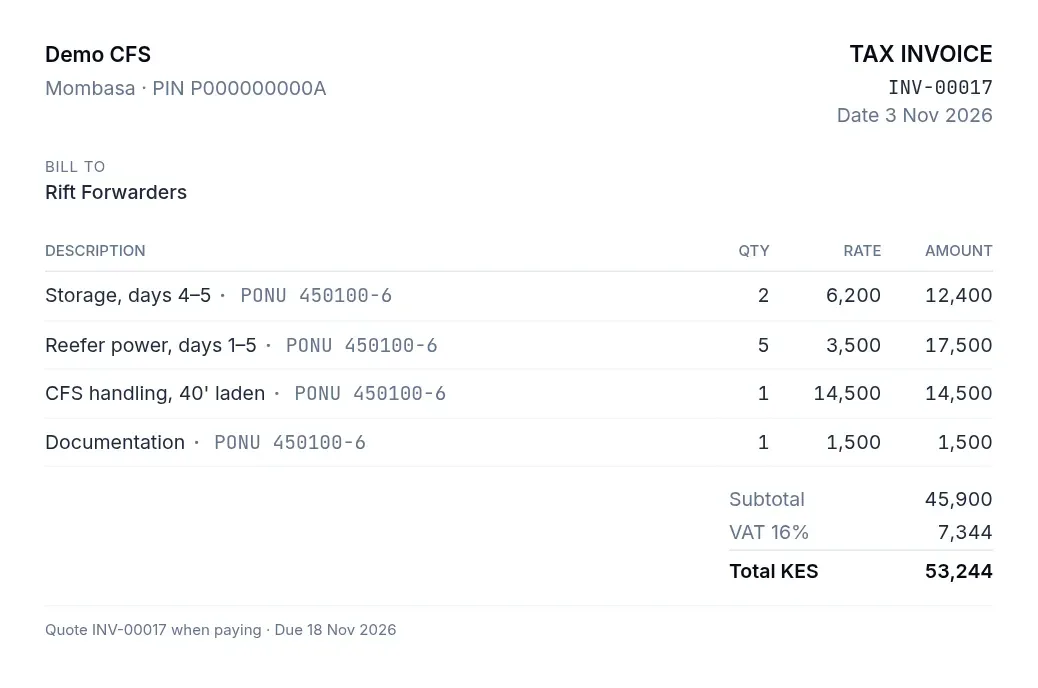
Tax invoice
Storage, handling and VAT on one page
Returns and reports, ready when they’re asked for
Charts for how the yard is running, and CSV downloads built from the same records.


-
Stock report
KRA Customs · KPA
-
Monthly CFS returns
KPA
-
Overstayed cargo (21+ days)
KRA Customs
-
Gate movements log
Security · Operations
-
Tally & outturn
Shipping lines · Consolidators
-
Storage aging
Finance
-
Revenue by client
Finance · Management
-
VAT summary
Finance (VAT return)
Every box keeps its own history
Who did what, and when, from gate in onwards. When someone asks what happened to a container, the answer is on one page.


Press Ctrl + K to find anything
Search containers, B/Ls, trucks, clients and invoices from any screen, and jump straight to the one you need.


Out on the floor, not stuck in the office
Yardpro runs in the browser, so tally clerks can count on a tablet and the gate can look up a box on a phone. There’s nothing to install, and light and dark themes suit a bright yard or a night shift.


Clients check their own boxes
Invite your agents and consignees to the client portal. They see where a box has got to and what they owe, on a computer or phone, without phoning you.
- Each box’s progress, from arrival to collection.
- Its dates, days in the yard, and any booked inspection or truck.
- Their own invoices and balance, ready to print.
- Other clients’ boxes, staff notes and yard slots stay private.


Everyone gets their desk, and only their desk
Invite your staff by email and give each person a role. The gate doesn’t see your invoices, and your company’s data is only visible to your company.
- Owner
- Everything, including the team, prices and settings.
- Yard supervisor
- Runs the yard, and can override a blocked gate out with a reason.
- Gate clerk
- Gate in and out, the yard map and today’s trucks.
- Customs desk
- Verification, customs status and client records.
- Tally clerk
- Stripping and stuffing counts on the floor.
- Finance
- Invoices, payments, M-Pesa, credit and reports.
Set it up around your site
Lay out your blocks and reefer plugs, name your shed bays, and set your truck and inspection hours. When your yard grows, add to it and carry on.


Questions
How much does it cost?
We review every new company, and once you’re approved you get a free week to try everything. After that you choose a monthly package. Talk to us for current prices.
Can our clients check their own containers?
Yes. Give an agent or consignee a login, and they can follow their boxes, customs status and invoices themselves, without phoning you.
Do we need to install anything?
No. Yardpro runs in a web browser on a computer, tablet or phone.
Can we use our own prices?
Yes. Free days, storage rates, reefer power, handling and documentation fees are all set by your company.
Does it fit our site?
Yes. You set your own blocks, with their bays, rows and tiers, and your reefer plugs, shed bays, truck slots and inspection hours. You can change them as your yard grows.
What about M-Pesa?
Yardpro is built to send payment requests to a phone and match paybill payments to invoices. The live connection to Safaricom is still being set up.
What if a box has to leave but the gate has blocked it?
A yard supervisor can override the block. They have to give a reason, and it stays on the record.
Can an invoice be changed after it’s issued?
No. You void it with a reason and bill again, and payments are reversed the same way, so the history stays intact.
Who can see our data?
Only people in your company, and each of them only sees the screens their role allows.
Put your yard on one screen
Every box, every desk and every shilling, on the same record.
-
1
Register your company
We review it, then your free week starts.
-
2
Set up your site
Your yard, bays, hours and prices.
-
3
Invite your team
Give each person a role.